Enterprise UX Case Study

Road Maintenance Workflow Platform

Designed a centralized enterprise platform for the Land Transport Authority (Singapore) that streamlines road maintenance operations, contractor collaboration, inspection workflows, work instructions, contract management, and operational dashboards.

40+

Enterprise Screens Designed

10+

User Roles Supported

6

Core Product Modules

100%

Responsive Enterprise UI

Project Information

Land Transport Authority

Government

Senior UX Designer

Enterprise Web Application

2025–2026

Figma • FigJam • Jira

Project Overview

Road maintenance operations involve multiple internal departments, contractors, inspection teams, and approval authorities. The existing process relied on disconnected systems, manual coordination, and limited visibility into project status. The objective was to design a unified enterprise workflow platform that improves collaboration, reduces administrative effort, and provides real-time operational insights.

Business Problem

Maintenance activities were spread across multiple systems, making it difficult to monitor progress, assign responsibilities, and track work completion.

Design Goal

Create a scalable, user-centered platform that simplifies complex workflows, supports multiple user roles, and provides actionable dashboards for operational decision-making.

UX Outcome

Designed a consistent enterprise experience covering authentication, user management, contract mapping, work instructions, inspection workflows, and executive dashboards.

Business Challenge

Road maintenance operations involve numerous stakeholders, contracts, inspection teams, engineers, and administrators. The existing workflow relied on manual coordination and multiple disconnected systems, resulting in limited visibility, slower approvals, and inconsistent user experiences.

⚠️

Fragmented Systems

Operational data was distributed across several applications, making it difficult for teams to track maintenance activities from initiation through completion.

👥

Complex User Roles

More than ten user groups—including LTA administrators, division representatives, contractors, inspectors, and contract officers—required different permissions and workflows.

📊

Limited Visibility

Managers lacked a centralized dashboard to monitor work instruction progress, contractor performance, inspection outcomes, and operational KPIs.

📄

Manual Processes

User onboarding, contract mapping, approvals, and reporting depended heavily on manual effort, increasing processing time and administrative overhead.

My Role

As the UX Designer, I collaborated closely with business analysts, product owners, developers, and client stakeholders throughout the product lifecycle, transforming complex operational requirements into intuitive user experiences.

UX Strategy

  • Requirement Analysis
  • Stakeholder Workshops
  • Feature Prioritization
  • Information Architecture

Interaction Design

  • User Flows
  • Wireframes
  • Navigation Design
  • Dashboard UX

Visual Design

  • High Fidelity UI
  • Responsive Layouts
  • Design System
  • Component Library

Delivery

  • Developer Handoff
  • Design QA
  • Sprint Support
  • Iteration Reviews

Project Team

The project followed an Agile delivery model, bringing together multidisciplinary teams throughout the design and development lifecycle.

Business Analysts

Defined business requirements, process flows, and acceptance criteria.

Product Owner

Prioritized product backlog and aligned business objectives.

UX Designer (My Role)

Created user journeys, wireframes, interactive prototypes, and final UI designs.

Developers

Implemented frontend and backend functionality based on UX specifications.

QA Team

Validated business scenarios and usability before release.

Design Process

A structured, iterative UX process ensured that business goals, user needs, and technical feasibility remained aligned throughout the project.

1

Discover

Stakeholder workshops, BRD analysis, existing system review, and requirement gathering.

2

Define

User roles, information architecture, navigation hierarchy, and workflow mapping.

3

Design

Wireframes, interactive prototypes, dashboard layouts, and enterprise UI design.

4

Validate

Stakeholder reviews, design iterations, developer collaboration, and usability improvements.

Project Impact

The platform consolidated multiple operational workflows into a unified enterprise experience, making maintenance activities easier to manage, track, and monitor.

40+

Enterprise Screens

10+

User Roles

6+

Core Modules

1

Unified Platform

Understanding the Users

Before designing the solution, I collaborated with business analysts, project stakeholders, and subject matter experts to understand existing operational workflows, user responsibilities, and pain points across the maintenance lifecycle. The objective was to identify opportunities to simplify complex processes while maintaining compliance with business rules and approval workflows.

Stakeholder Workshops

Conducted multiple requirement discussions with LTA representatives to understand existing maintenance operations, approval hierarchy, and reporting expectations.

Requirement Analysis

Reviewed Business Requirement Documents, workflow diagrams, and use cases to define system behaviour and functional priorities.

Workflow Mapping

Mapped user journeys for administrators, contract officers, inspectors, and contractor teams to identify redundant steps and usability issues.

Primary Users

The platform supports multiple user groups, each with unique responsibilities, permissions, and operational objectives.

👤

LTA Administrator

Responsible for user management, roles, permissions, system configuration, and governance.

Goals

  • Create users quickly
  • Manage permissions
  • Reduce administrative effort
📋

Division Representative

Manages contracts, maintenance activities, assets, and operational planning.

Goals

  • Track work progress
  • Assign responsibilities
  • Monitor contractors
🚧

Contractor

Executes maintenance work, updates work instructions, uploads evidence, and completes assigned activities.

Goals

  • Complete work efficiently
  • Submit updates
  • Avoid delays
📈

Management

Monitors KPIs, resource utilization, inspection outcomes, and contractor performance.

Goals

  • Real-time dashboards
  • Operational insights
  • Performance reporting

UX Design Principles

To ensure consistency across the enterprise platform, the following principles guided every design decision.

Reduce Complexity

Break complex enterprise workflows into smaller, manageable tasks using progressive disclosure.

Role-Based Experience

Show only relevant navigation, actions, and dashboards based on user permissions.

Consistency

Use reusable components, consistent layouts, and predictable interactions across all modules.

Information Architecture

The navigation structure was organized around user responsibilities rather than system functionality, allowing users to locate information quickly with minimal cognitive effort.

Dashboard

  • Overview
  • Performance
  • Analytics
  • Reports

User Administration

  • Users
  • User Enrollment
  • Roles
  • Permissions

Operations

  • Contracts
  • Assets
  • Sectors
  • Maintenance
  • Inspection

Support

  • Notifications
  • Audit Logs
  • Reports
  • Settings

Typical User Journey

The workflow below represents a simplified maintenance lifecycle for a contractor.

1

Login

2

Receive Work Instruction

3

Execute Maintenance

4

Upload Evidence

5

Inspection & Approval

6

Dashboard Update

Wireframing & Interaction Design

Once the information architecture was finalized, I translated business requirements into low-fidelity wireframes to validate screen layouts, navigation hierarchy, content organization, and user interactions before moving to visual design. Each wireframe was reviewed with business stakeholders, developers, and product owners to ensure usability and technical feasibility.

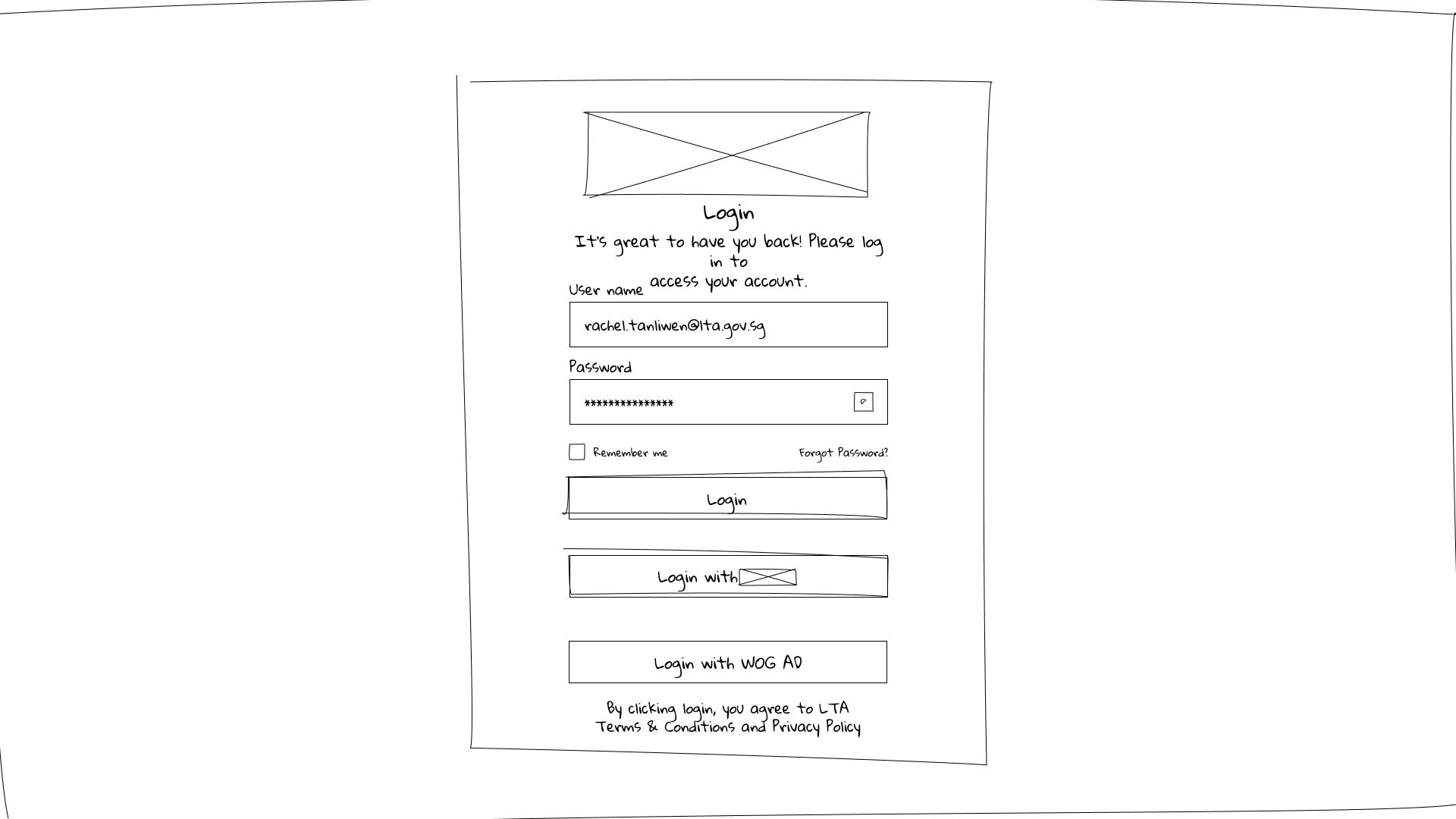
Login Wireframe
Authentication

Secure Login Experience

Designed a clean authentication experience supporting multiple user types including administrators, contract officers, contractors, and inspection teams. The layout prioritizes clarity while reducing login friction and maintaining enterprise security.

UX Decisions

  • Minimal visual distractions
  • Clear primary action
  • Password recovery support
  • Future-ready for SSO integration
  • Accessible form layout
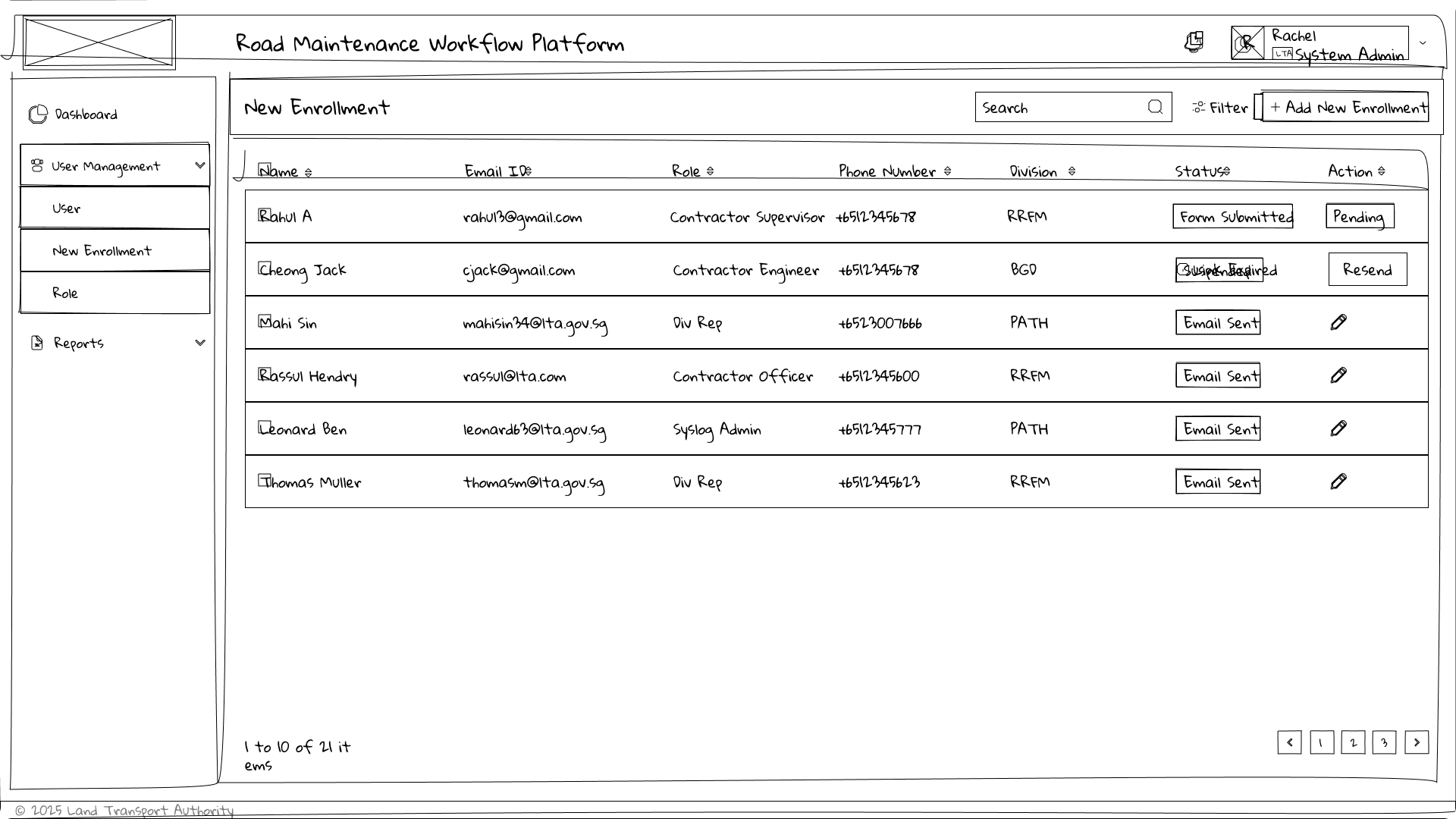
User Management

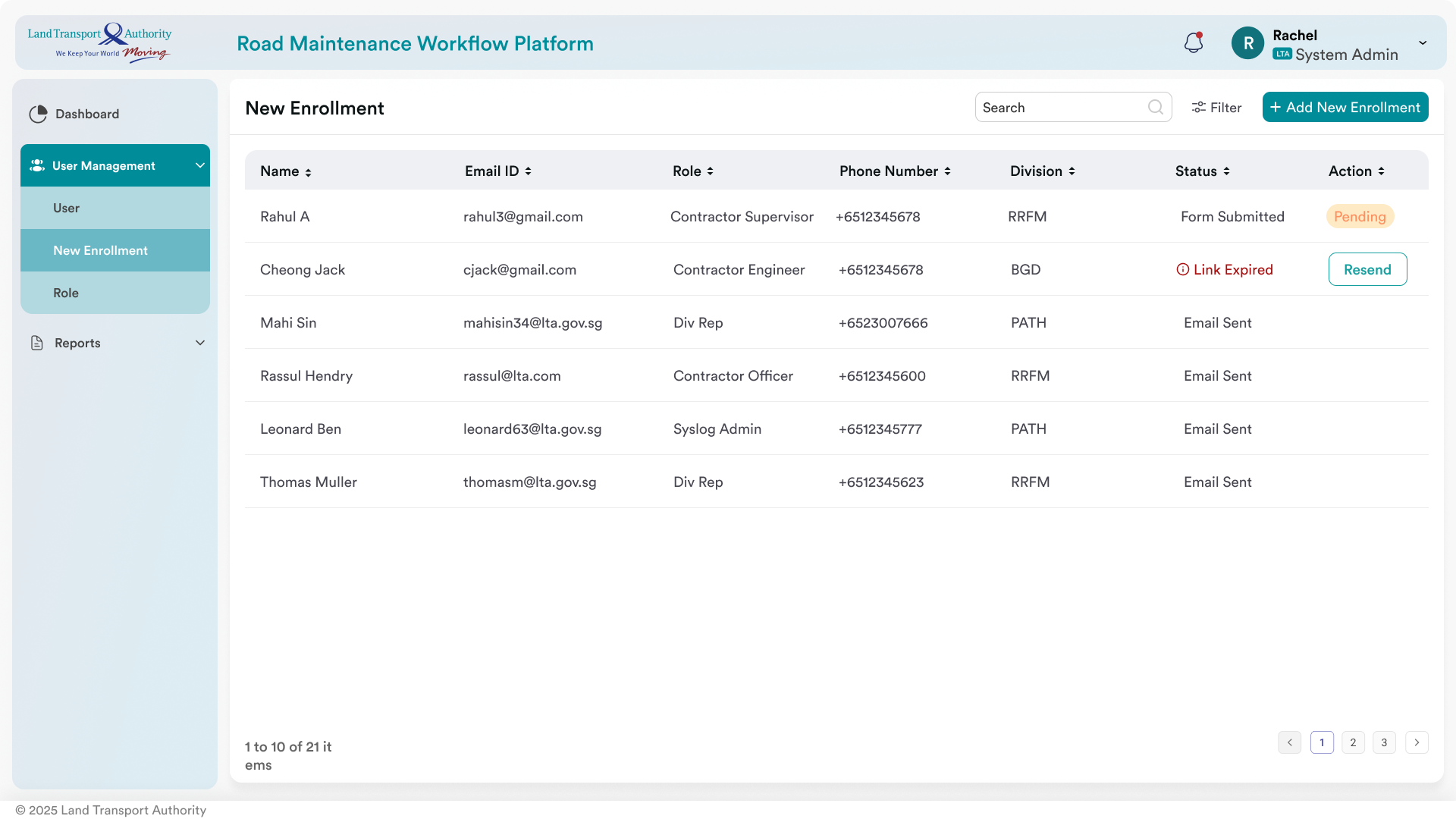
User Enrollment

Creating enterprise users involved multiple business rules, role assignments, division mapping, and approval workflows. The design breaks this complex task into clear, manageable sections, reducing cognitive load for administrators.

Key Improvements

  • Grouped related fields
  • Reduced scrolling
  • Logical form hierarchy
  • Consistent action buttons
  • Inline validation support
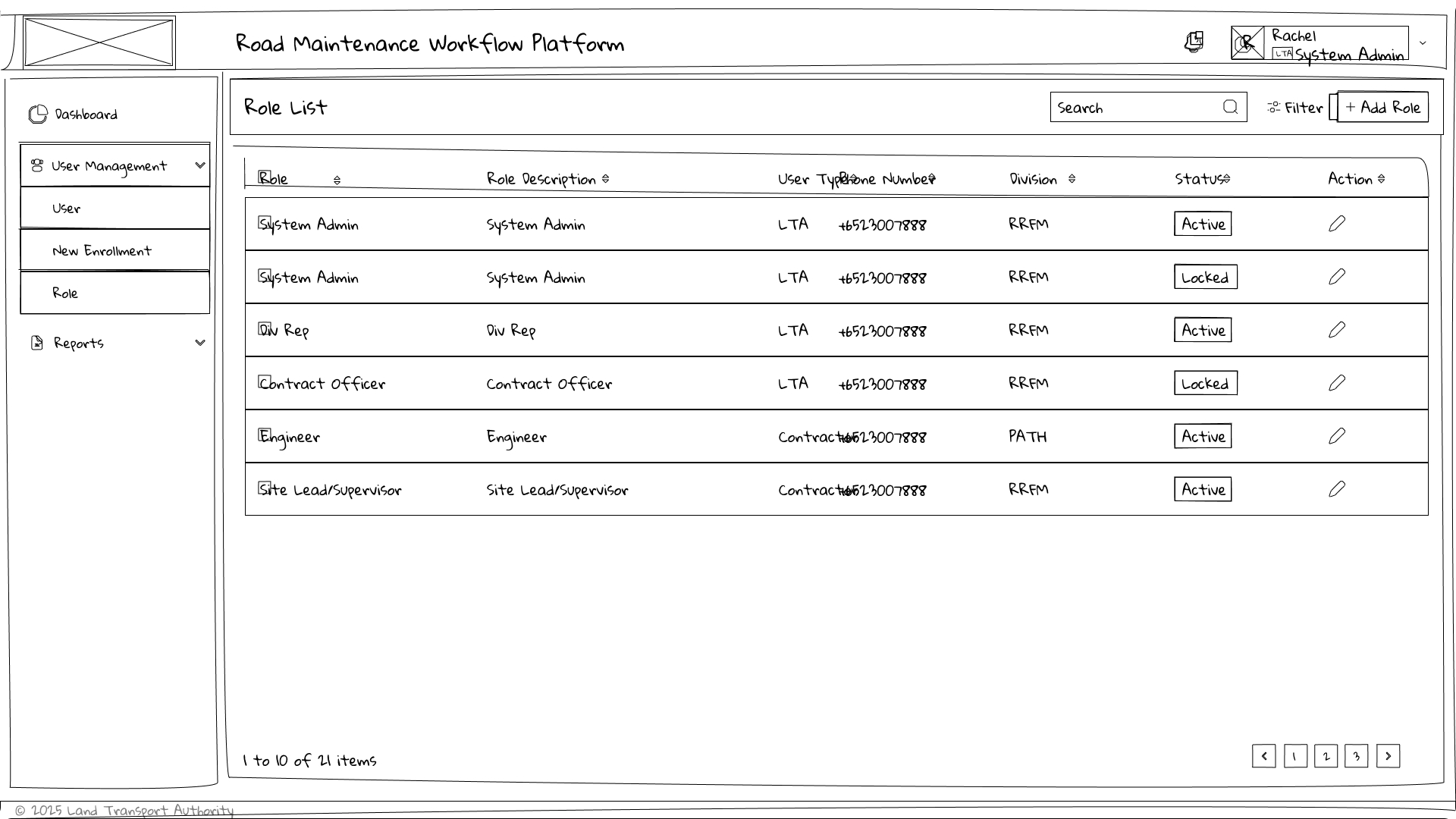
Administration

Role & Permission Management

Administrators needed an efficient way to create, edit, search, and assign permissions across multiple organizational roles. The interface emphasizes discoverability, filtering, and quick administrative actions.

Design Decisions

  • Search-first interface
  • Table optimized for scanning
  • Bulk administrative actions
  • Reusable enterprise table pattern
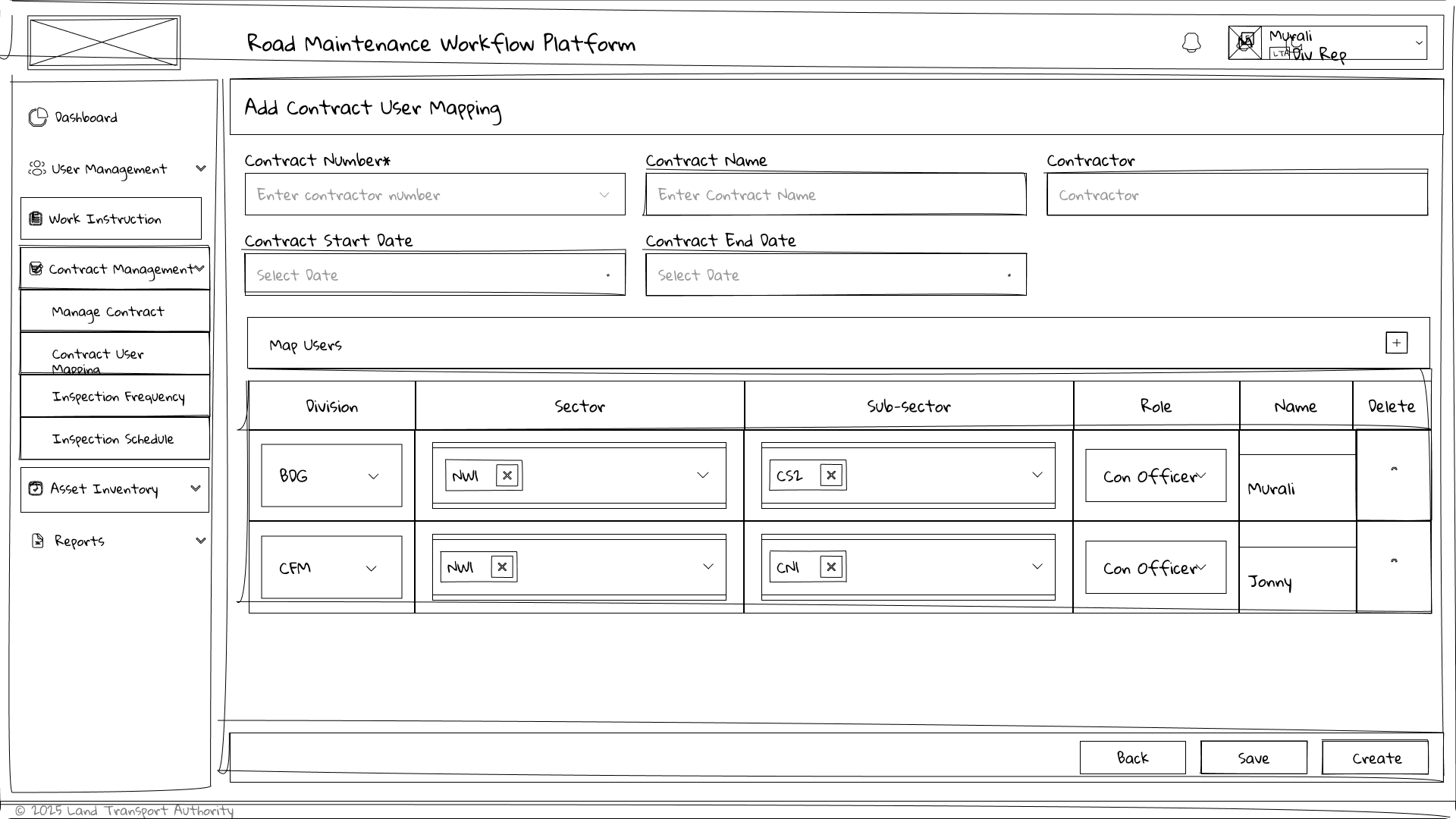
Contract Management

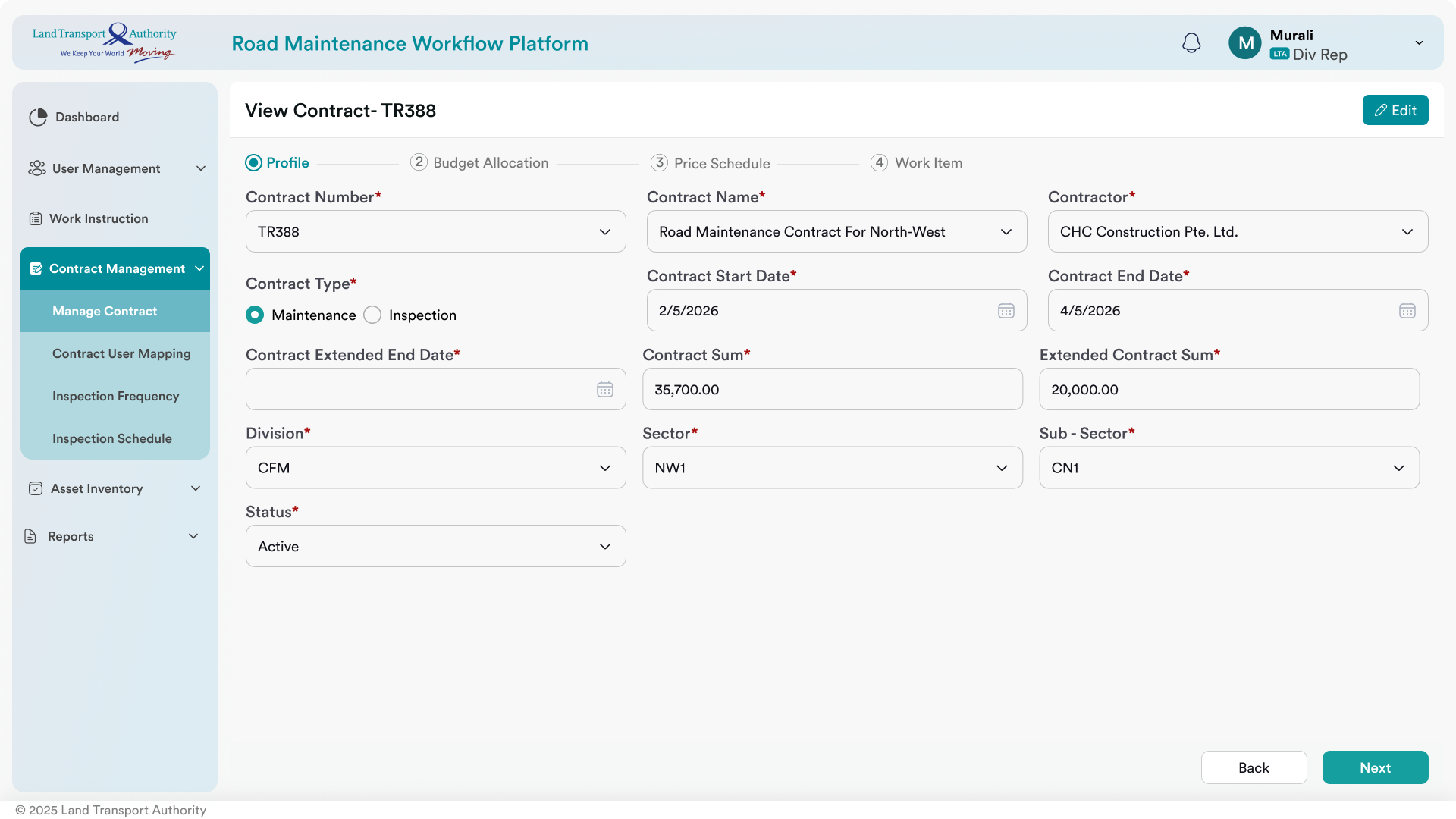
Contract User Mapping

One of the most complex workflows required mapping users to contracts, sectors, sub-sectors, and operational responsibilities. The interaction design simplifies this process using structured forms and contextual information.

UX Goals

  • Reduce mapping errors
  • Improve discoverability
  • Logical grouping
  • Consistent enterprise forms
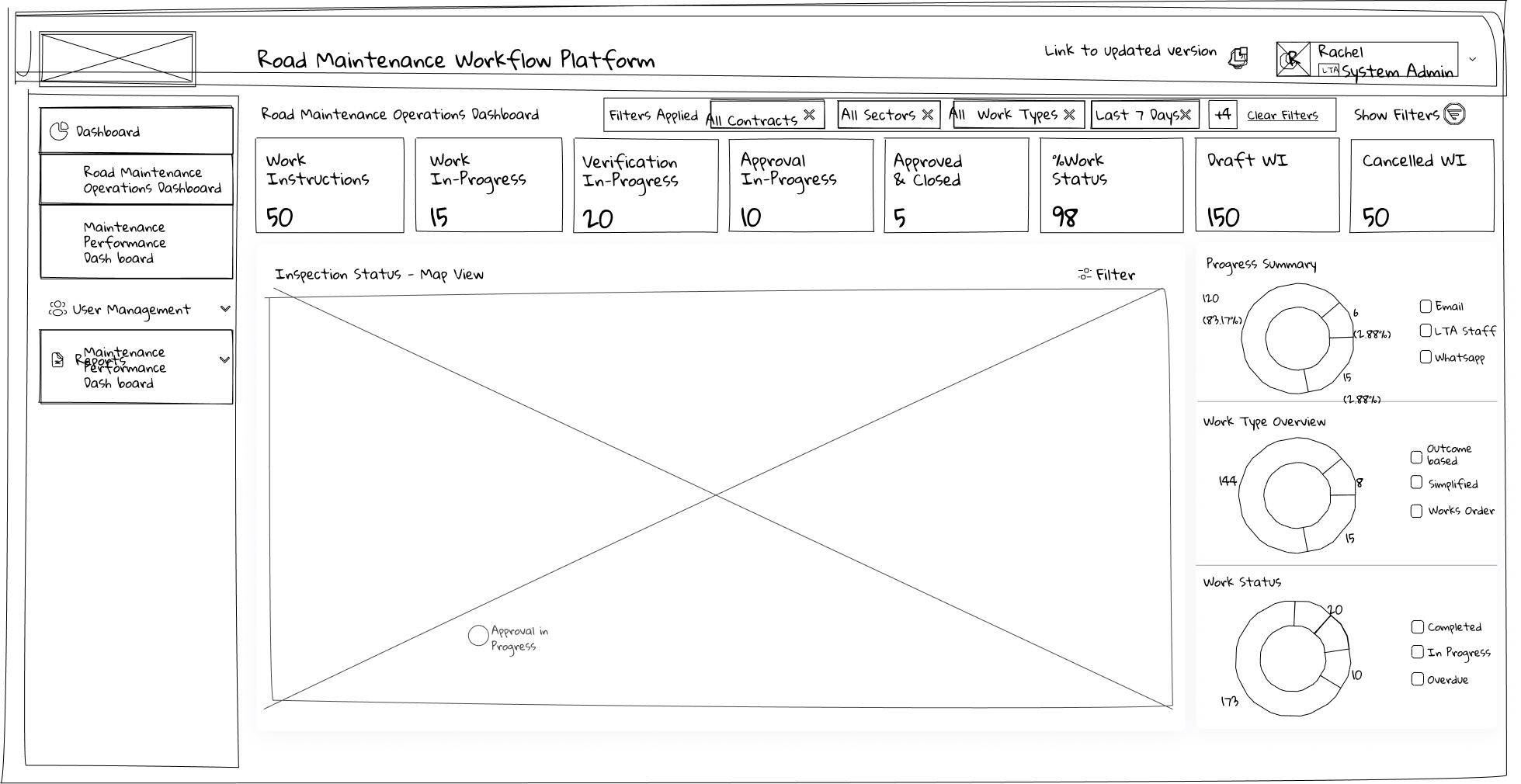
Dashboard

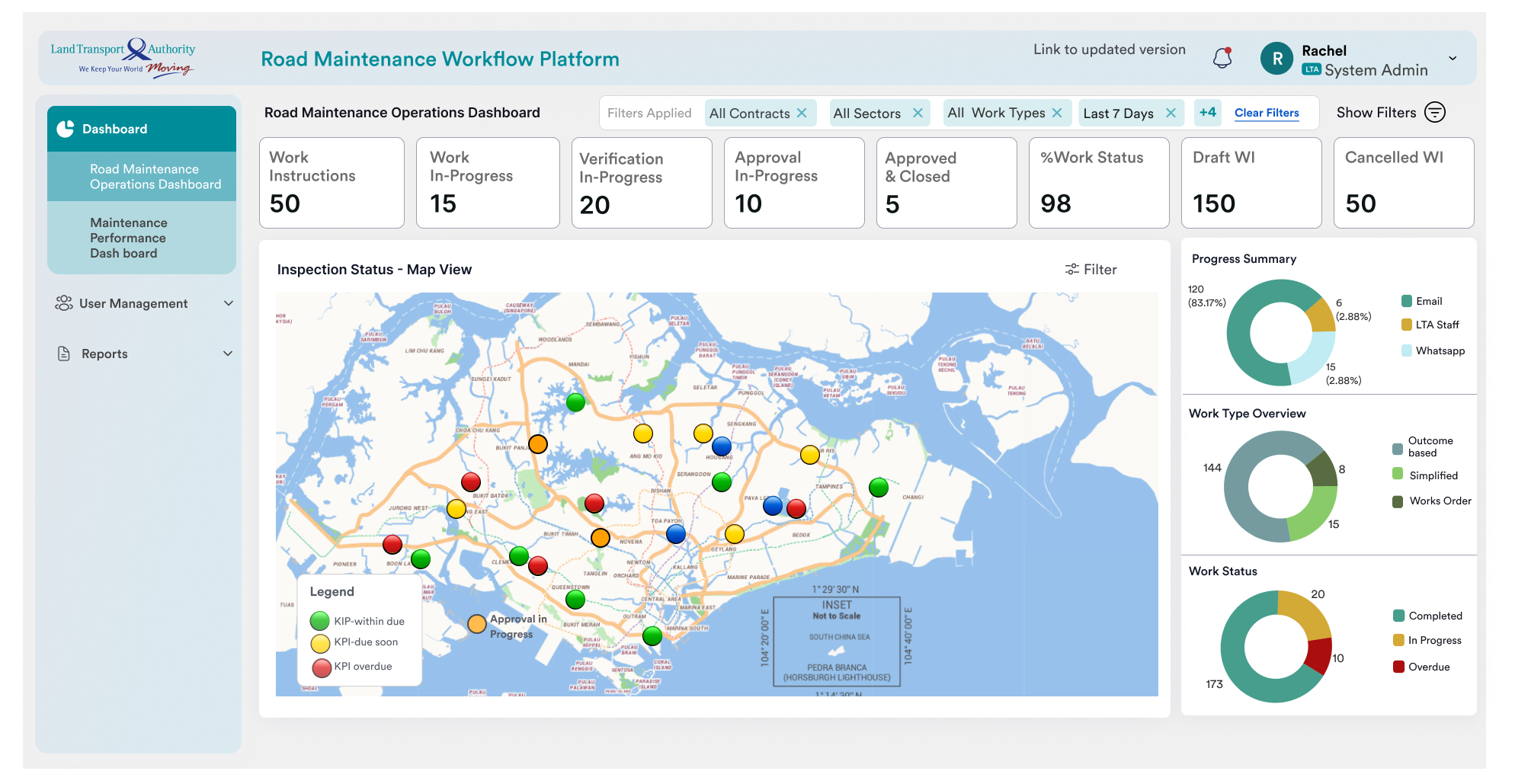
Operational Dashboard

The dashboard provides executives and operational teams with real-time visibility into maintenance activities, inspection status, contract performance, and key operational metrics. Information hierarchy was designed to support rapid decision making.

Dashboard Principles

  • KPI-first layout
  • Visual hierarchy
  • Actionable insights
  • Quick navigation
  • Data prioritization

High-Fidelity User Interface

After validating the wireframes with stakeholders, the interface evolved into a modern enterprise design focused on consistency, efficiency, and usability. A reusable component library and standardized interaction patterns ensured a cohesive experience across all modules.

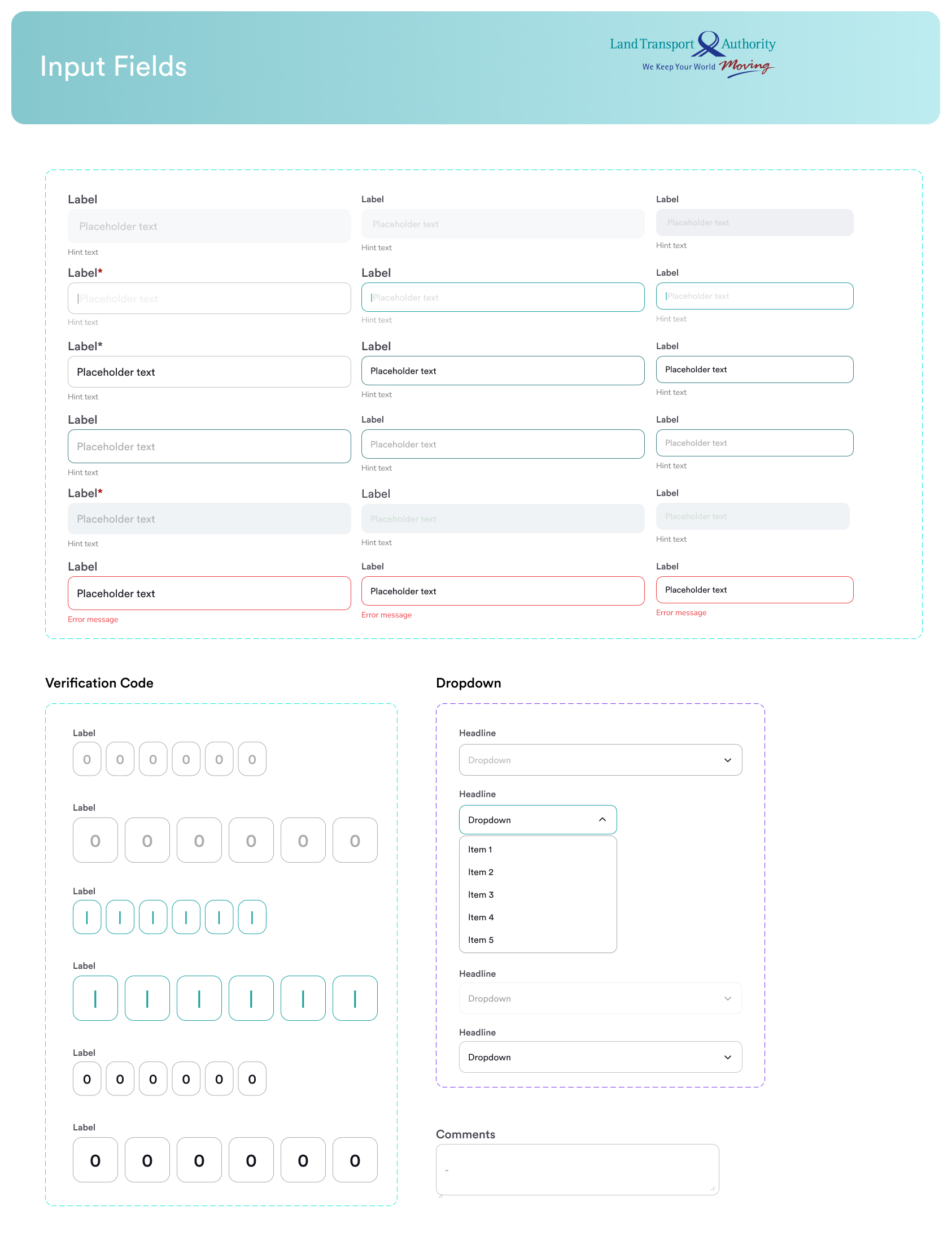
Design System

To maintain consistency across more than 40 enterprise screens, a reusable design system was established with standardized components, typography, spacing, and interaction patterns.

Typography

LTA Font Family
Heading Scale
Accessible Text Hierarchy

Components

Buttons
Forms
Cards
Tables
Dialogs

Spacing

8px Grid System
Consistent Margins
Responsive Layouts

Visual Language

Status Colours
Icons
Elevation
Enterprise Data Tables

Accessibility Considerations

Accessibility was incorporated throughout the design process to ensure the platform is usable by a diverse range of users.

✔ Colour Contrast

High contrast combinations improve readability across dashboards.

✔ Keyboard Navigation

Interactive elements are designed to support keyboard users.

✔ Clear Labels

Consistent labels and helper text reduce cognitive load.

✔ Responsive Design

Layouts adapt across desktop, tablet, and laptop resolutions.

Cross-functional Collaboration

Design was an iterative process involving continuous collaboration with business analysts, developers, QA engineers, and client stakeholders.

📝

Requirements

Requirement workshops & business analysis

🎨

Design

Wireframes, prototypes & UI reviews

💻

Development

Design handoff & implementation support

Validation

Design QA and stakeholder acceptance

Challenges & Design Decisions

Complex Business Rules

Multiple approval paths and role-based permissions required careful information architecture.

Large Data Tables

Enterprise users manage large datasets, therefore filtering, sorting, and search became primary interactions.

Balancing Simplicity

The biggest challenge was reducing complexity without removing essential functionality.

Project Outcome

The final solution delivered a centralized enterprise platform that simplified operational workflows and improved visibility across maintenance activities.

40+

Screens Designed

10+

User Roles

6+

Enterprise Modules

1

Unified Workflow Platform

Reflection

This project strengthened my expertise in designing large-scale enterprise applications with complex workflows, multi-role access control, dashboard visualization, and information-heavy interfaces. The experience reinforced the importance of stakeholder collaboration, iterative design, and building scalable design systems that improve both usability and development efficiency.